


Related
The Vessel Command, Control and Management System (VC2MS) is intended to facilitate intuitive access to relevant system information for rapid diagnosis and control input.
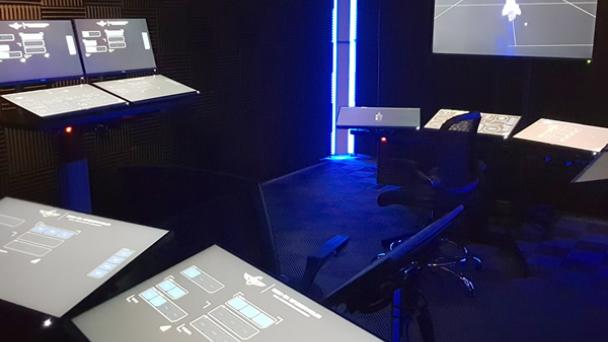
The primary interface to the Vessel Command and Control Management System (VC2MS) are touch screens. These display a predefined group of modular software control inputs and data visualisations – known as a panel - for managing a particular shipboard function. A screen can be configured to display any panel.
Groups of screens are installed to allow multiple functions of a particular ship system to be monitored and managed. For example, the helm has three horizontally-mounted screens which allow for key maneuvering and navigation panels to be available the helm operator. These groups of screens are referred to as consoles.
Physical Configuration
Consoles have two main kinds of mounting configuration.
Deck Mount
A deck mount offers a height-adjustable tabletop surface onto which multiple screens can be mounted in both horizontal or vertical orientations (or a combination). Horizontal orientation provides for more natural control input and allows the operator to see beyond the console to other areas on the deck. Vertical orientation restricts visibility beyond the console but allows for greater screen density.
Deck mounts can be two or three screens wide, depending on space and functional requirements.
Deck mounts can be configured for seated or standing operation.
Bulkhead Mount
A bulkhead mount has screens attached directly to the bulkhead in a vertical orientation. This type of mount is typically used for screens that have a primarily monitoring function.
Software Configuration
The specific panels displayed on a console can be changed depending on operating mode. For example, if the helm operator needs to shift from impulse to RCS maneuvering, the impulse panels can be swapped out for RCS panels.
This also means that operators can customise consoles to their requirements or preference.
Main Consoles
Consoles configured in the training simulator include:
Helm
The helm is the primary navigation console and is a deck mount three screens wide with screens solely in horizontal configuration and typically operated in seated position to allow visibility of the main viewer.
Tactical
The tactical console is a deck mount two screens wide with screens in both horizontal and vertical configuration, typically operated by one or two operators standing.
Science
The science console is a deck mount three screens wide with screens solely in horizontal configuration by a standing operator to allow visibility over the conn to the main viewer.
Operations
The operations console is a deck mount two screens wide with screens in both horizontal and vertical configuration, typically operated by one or two operators standing (an engineer, an operations officer or both).